
The call runs between the two browsers, not through a ClinyPal server, which is why it's private and why a home router can occasionally get in the way. This is the plain-language version.
Browser to browser
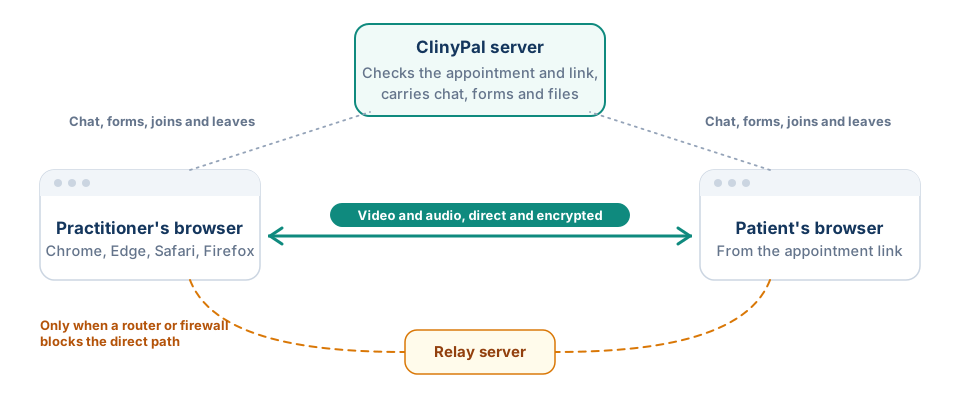
A ClinyPal call is made by the two browsers themselves, using the video standard built into Chrome, Edge, Safari and Firefox. ClinyPal's server introduces the two sides, checks the appointment and the patient's link, carries the chat, forms and files, and tells each side when the other joins or leaves. The video and audio travel directly between the practitioner's device and the patient's where the network allows, or through a relay server when a home router or office firewall blocks a direct path. Relay access is granted per call for an hour and renewed while the call runs, so a long consultation doesn't drop at the hour mark.
What that means
- Video and audio are encrypted end to end between the browsers and are never recorded by ClinyPal. Nothing said in the call is kept; the record of the visit is what the practitioner writes up.
- Quality depends on both connections. ClinyPal watches the link and drops to lower video or audio only when it struggles, then steps back up.
- If a connection breaks, the browser reconnects on its own for a while, keeping the chat and files; Unable to reconnect. Please refresh the page means it gave up, and reopening the link rejoins the same session.
- Chat messages, files for 7 days, submitted forms and recorded consent are stored with the appointment in ClinyPal.
- No app, account or download is needed on the patient's side; the link in their message is the whole invitation.
For what to do when something fails, see Fix a telehealth connection problem.