An invoice's status says what's owed; its history says how it got there. Both are worth reading before you change anything on a disputed bill.
The statuses
| Status | Meaning | What you can do |
|---|---|---|
| Issued | Raised, nothing paid yet. | Edit, take payment, send a payment link, void, write off. |
| Partially paid | Some money received, a balance still owing. Also the state after a partial write-off once something has been paid; with nothing paid, a partial write-off leaves it Issued. | Edit (not below what's paid), take payment, send a link, refund, write off the rest. |
| Paid | Settled in full. | Refund. The lines are locked, and void isn't offered; a paid invoice is reversed by refund. |
| Refunded | Everything paid on it has been refunded; a credit note exists. | Nothing further; locked. Raise a new invoice if needed. |
| Void | Canceled with a reason; never owed. | Nothing further; locked. |
| Written off | The whole balance written off. | Locked. A payment taken before the write-off can still be refunded. |
Overdue isn't a status but a marker on an Issued or Partially paid invoice whose due date has passed. The due date is the issue date plus the clinic's Default due days from Invoice Settings. A partially refunded invoice keeps its status and gains a credit note, after which it can't be edited.
How an invoice moves between statuses
You never set a status by hand. ClinyPal works it out from what has happened to the invoice: the money taken, anything written off, voided or refunded. The diagram shows every path an invoice can take, and most invoices only ever travel the top line.
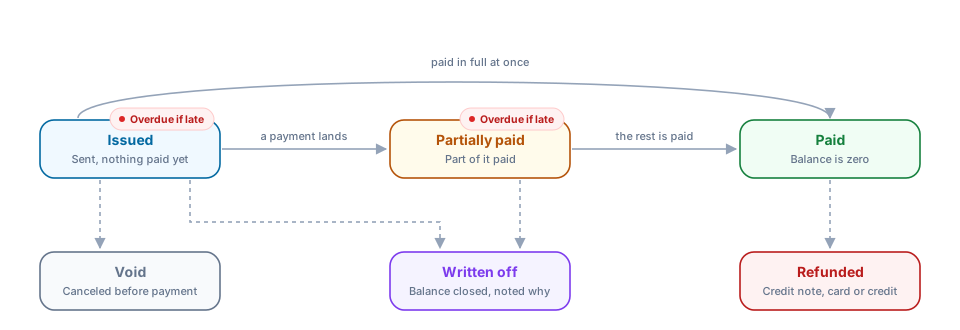
The everyday path. A new invoice starts as Issued. When a payment covers the whole amount it goes straight to Paid, which is what happens to most invoices settled at the front desk. When a payment covers only part of it, the invoice becomes Partially paid and stays there, however many smaller payments follow, until the balance reaches zero and it turns Paid. Voiding a payment moves it back the same way: the balance goes up again and the status follows.
Overdue. The red tag on Issued and Partially paid isn't a separate status. It appears once the due date has passed, the issue date plus the Default due days in Invoice Settings, and it disappears as soon as the invoice is paid. An overdue invoice can still be edited, paid, voided or written off like any other; the tag is there so it stands out in the invoice list and in the Outstanding balances report.
Closing an invoice that won't be paid. There are two ways out, and the choice depends on whether the money was ever owed. Void is for an invoice that shouldn't exist, such as a visit billed twice or billed to the wrong patient. It's only possible while nothing has been paid, it asks for a reason, and afterward the invoice counts as never owed. Written off is for a real debt you've decided not to chase: a patient who moved away, or a small balance not worth the follow-up. It works from Issued or Partially paid, the reason is noted, and anything already paid stays recorded. Writing off only part of the balance doesn't close the invoice; it stays Partially paid, or Issued if nothing was paid yet.
After it's paid. A paid invoice can't be voided, because money has changed hands. It's reversed with a refund instead, which creates a credit note and sends the money back to the card or to the patient's account credit. When everything paid on the invoice has been refunded it becomes Refunded. A partial refund leaves the status as it is and adds the credit note, and from then on the invoice can't be edited. Void, Written off and Refunded are all final: the invoice is locked, and if something still needs billing you raise a new invoice.
Every one of these moves is recorded in the invoice's change history below, with who made it and when, so you can always trace how an invoice reached the status it shows.
Change history
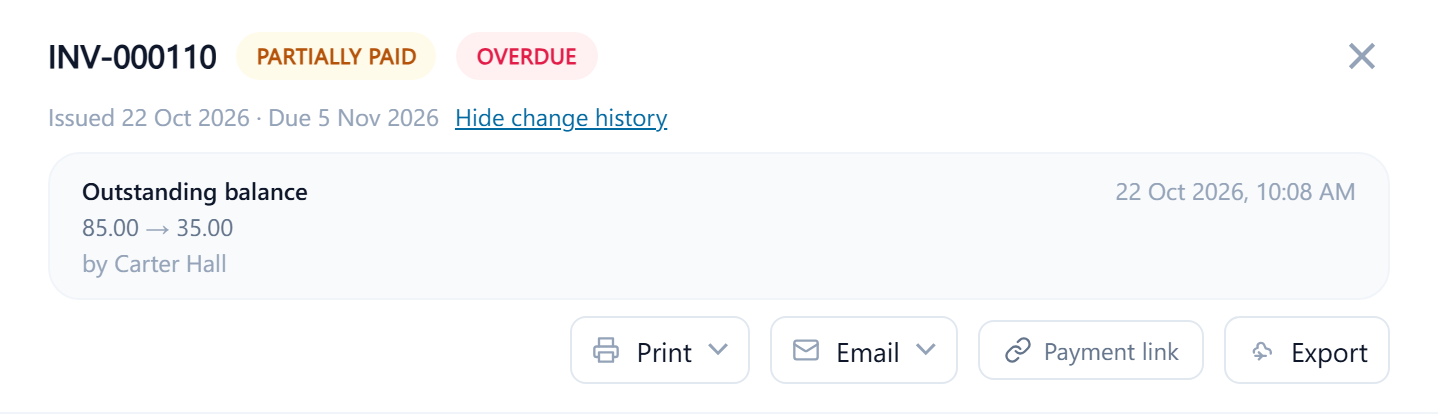
Open the invoice and select the history link at the top. Every tracked change is listed with the field, the old and new value, who made it and when: changes to the grand total, status changes such as a full refund, a write-off or the void, and each payment staff record, shown as the outstanding balance it moved. Line edits aren't listed one by one; they show as the change in the total. Use it when a patient disputes an amount, to see what was billed originally, or to see who applied a discount. Payments have their own receipts with their reason if voided, and the clinic-wide audit log lists the same changes, with the reason given for a void or refund.