
Allergies, medications and alerts are the things a practitioner must see before treating, so they sit at the top of the record and on the appointment. Keep them current; nobody reads an old list.
Summary and timeline
The Clinical section is only available to roles with clinical access. It has two halves. The Summary shows what a practitioner needs before treating: Allergies (or No known allergies, or Not yet recorded if nobody has said either), active Alerts, the Latest vitals with their date, and Active medications. The Timeline lists every entry of every kind, newest first, with filters for each type, and an edit and delete control on each.
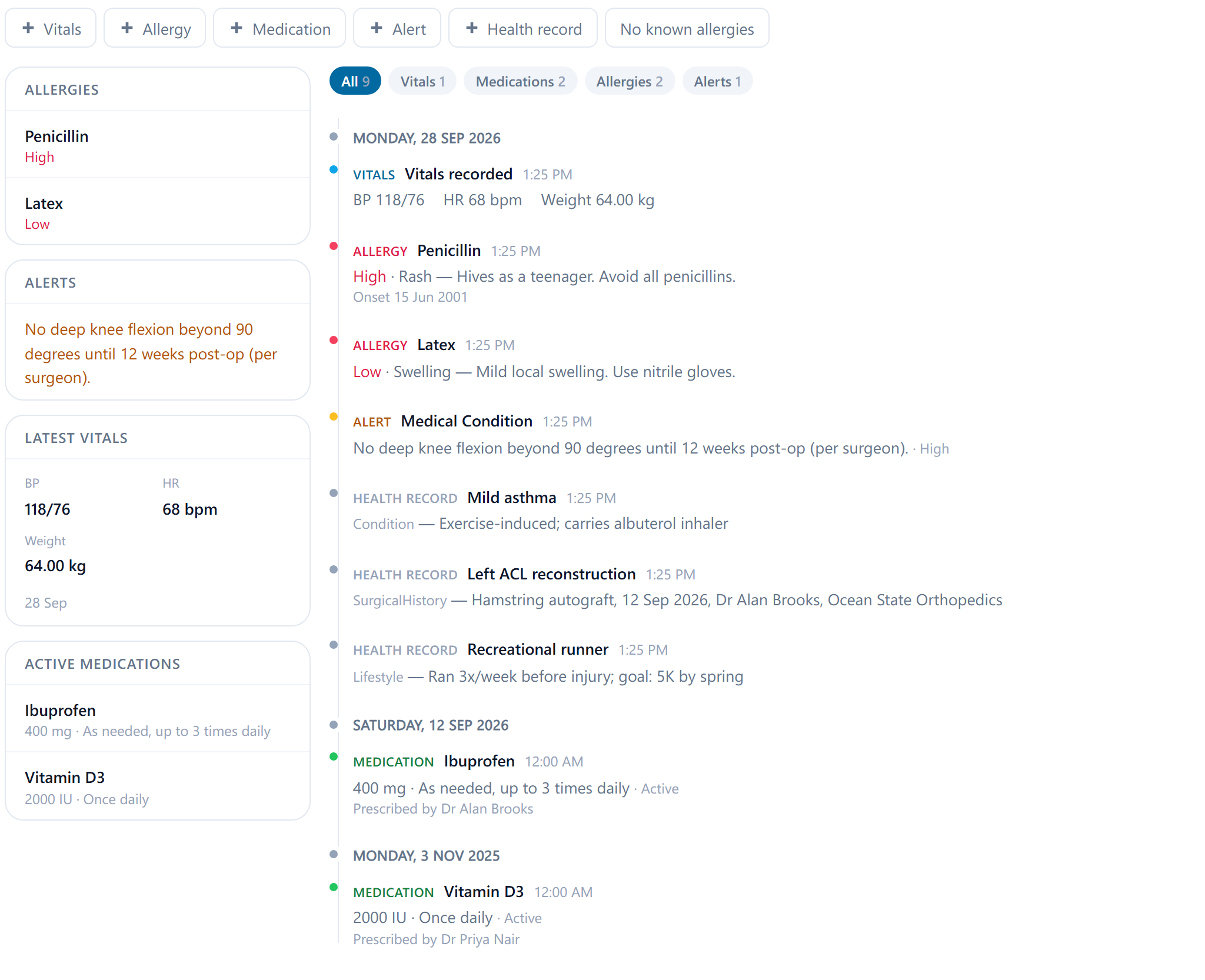
If the patient has told you they have no allergies, select No known allergies so the summary says so; an empty allergy list otherwise reads as not asked. Allergies are also reachable from the record header on every section.
The five kinds of entry
- Add allergy: the allergen, a Reaction (Rash, Anaphylaxis, Swelling, Nausea, Respiratory, Other or Unspecified), a severity of Low, Medium or High, a Status of Active, Resolved or Inactive, the onset date and notes. Only active allergies show on the summary, so set the status rather than deleting one that no longer applies.
- Add medication: Name, Dose, Frequency, Start date, Prescribed by, Notes and a Status of Active, Discontinued or Completed. Only active ones show on the summary; set the status rather than deleting when a medication stops.
- Alert: a warning staff must see, with an Alert type (Drug Interaction, Medical Condition, Mental Health, Infection Risk, Special Needs or Other), a message and a severity. An alert can be marked inactive instead of deleted when it no longer applies.
- Add health record: the longer history, under a Category of Allergies, Medications, Conditions, Surgical history, Family history or Lifestyle, with a title, detail and optional severity.
- Record vitals: height, weight, blood pressure, heart rate, temperature, oxygen saturation and respiratory rate, with notes, optionally linked to the appointment it was taken at. Each set keeps its own date, so weight or blood pressure can be read back over time, and the entries also show under the appointment in the patient's Appointments section.
Each entry can be edited or deleted from the timeline. Deleting is for an entry made in error; a condition that has resolved is better edited to say so, so the history stays complete.